II/ SETTING UP NAME SERVER
We use the omarine.org domain to illustrate. The server has IP address of 192.168.0.1, named omarine.omarine.org. You replace them with your own values when applied in practice.
1. Creating a key to update resource records
There are several ways to create a secure DNS key, we use the following command:
sudo ddns-confgen -r /dev/urandom -k dhcp-key -z omarine.org
The output looks like this:
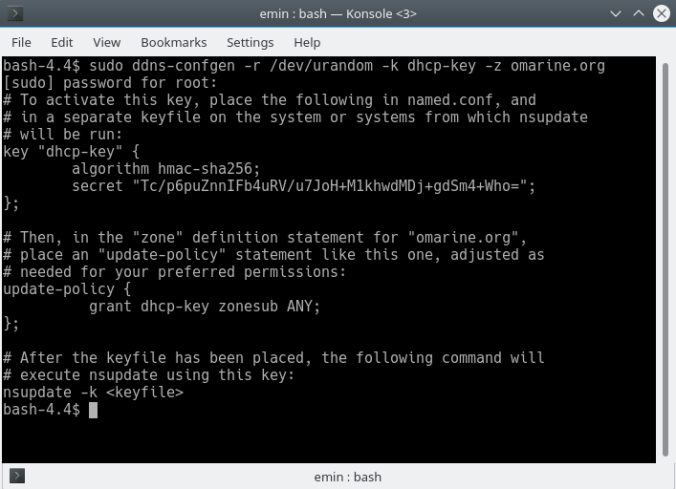
Here we have created a key named “dhcp-key”, using the hmac-sha256 algorithm, the secret is “Tc/p6puZnnIFb4uRV/u7JoH+M1khwdMDj+gdSm4+Who=”. This key will be used frequently for the DHCP server to dynamically update resource records. We also use it to dynamically update resource records with the nsupdate command.
We create key file .dhcp-key in the /root directory as follows:
sudo tee /root/.dhcp-key << EOF
key "dhcp-key" {
        algorithm hmac-sha256;
        secret "Tc/p6puZnnIFb4uRV/u7JoH+M1khwdMDj+gdSm4+Who=";
};
EOF
No one can access the /root directory except root. Be more careful, you set mode bits directly on the file:
sudo chmod 400 /root/.dhcp-key
2. Configuring name server
First, we put the key just created above into the configuration file of the name server:
sudo tee -a /srv/named/etc/named.conf << EOF
key "dhcp-key" {
        algorithm hmac-sha256;
        secret "Tc/p6puZnnIFb4uRV/u7JoH+M1khwdMDj+gdSm4+Who=";
};
EOF
Next is to define an acl:
sudo tee -a /srv/named/etc/named.conf << EOF
acl dns-dhcp-nets {
        ! { !localnets; any; }; key "dhcp-key";
};
EOF
In addition to the firewall we allow querying only hosts on a network for which the system has an interface:
sudo sed '/statistics/a \    allow-query { localnets; };' \
         -i /srv/named/etc/named.conf
Now add some zones.
Add zone “localhost”:
sudo tee -a /srv/named/etc/named.conf << EOF
zone "localhost" {
        type master;
        file "pz/localhost.db";
};
EOF
Add zone “omarine.org”:
sudo tee -a /srv/named/etc/named.conf << EOF
zone "omarine.org" {
        type master;
        file "pz/omarine.org.db";
        allow-update { dns-dhcp-nets; };
};
EOF
Add reverse zone “0.168.192.in-addr.arpa”:
sudo tee -a /srv/named/etc/named.conf << EOF
zone "0.168.192.in-addr.arpa" {
        type master;
        file "pz/192.168.0";
        allow-update { dns-dhcp-nets; };
};
EOF
Finally, we initialize the zone data files:
sudo tee /srv/named/etc/namedb/pz/localhost.db << "EOF"
$TTL 3D

$ORIGIN localhost.

@     1D     IN     SOA     @     root (
                    2013050101    ; serial
                    8H            ; refresh
                    2H            ; retry
                    4W            ; expiry
                    1D            ; minimum
                    )

@     IN     NS     @
      IN     A      127.0.0.1
EOF


sudo tee /srv/named/etc/namedb/pz/192.168.0 << "EOF"
$ORIGIN .
$TTL 259200     ; 3 days
0.168.192.in-addr.arpa  IN SOA  omarine.omarine.org. adm.omarine.org. (
                                191        ; serial
                                28800      ; refresh (8 hours)
                                7200       ; retry (2 hours)
                                2419200    ; expire (4 weeks)
                                86400      ; minimum (1 day)
                                )

                        NS      omarine.omarine.org.
$ORIGIN 0.168.192.in-addr.arpa.
$TTL 86400      ; 1 day
1                       PTR     omarine.omarine.org.
EOF


sudo tee /srv/named/etc/namedb/pz/omarine.org.db << "EOF"
$ORIGIN .
$TTL 259200     ; 3 days
omarine.org             IN SOA  omarine.omarine.org. adm.omarine.org. (
                                340        ; serial
                                28800      ; refresh (8 hours)
                                7200       ; retry (2 hours)
                                2419200    ; expire (4 weeks)
                                86400      ; minimum (1 day)
                                )
                        NS      omarine.omarine.org.
$ORIGIN omarine.org.
omarine                 A       192.168.0.1
EOF
For the new configuration to take effect, you restart the name server:
sudo systemctl restart named
3. Dynamic DNS update using nsupdate command with secure DNS key
We run the nsupdate command as follows:
sudo nsupdate -k /root/.dhcp-key
The video below describes the addition of some records to the omarine.org zone
 Artificial Intelligence Kiosk